Start a meditation session with an optional time goal. The timer runs in the Dynamic Island and on your lock screen. You don't need to keep the app open. A notification fires when you hit your goal.
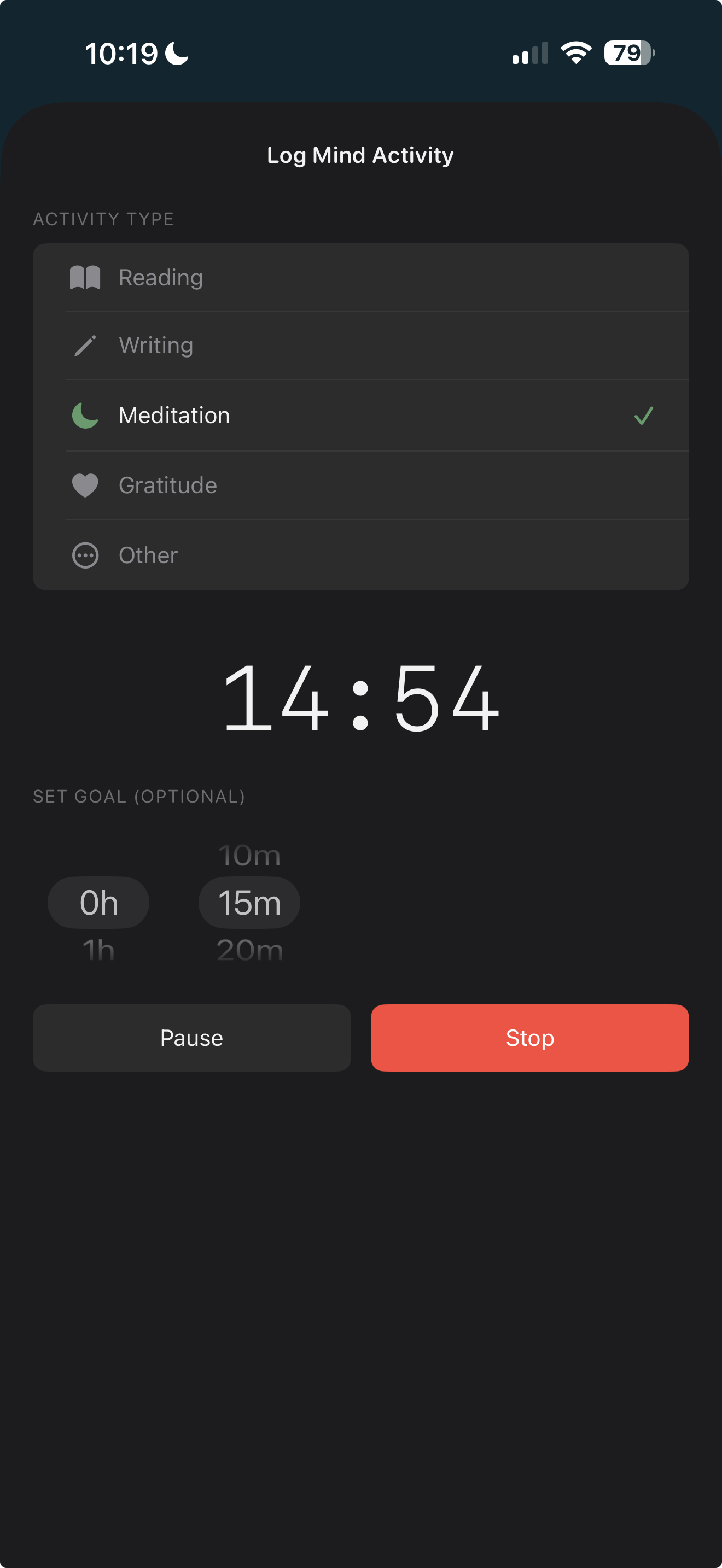
Tap + on the Today view and choose Meditation. Optionally set a time goal (5-minute increments, up to 5 hours).
Start the timer. It appears in the Dynamic Island and on your lock screen. Put your phone down.
When done, stop the timer. Your session is logged with duration. Mind time rolls into your daily summary.
"Set a goal, start the timer, put your phone down — the Dynamic Island handles the rest."
Do I need to keep the app open?
No. Once started, the timer runs in the Dynamic Island and on your lock screen. You can close the app or use other apps.
Can I set a custom time goal?
Yes — set a goal in 5-minute increments, from 5 minutes up to 5 hours. Or meditate without a goal.
What happens when I hit my goal?
A push notification fires: "Meditation goal reached!" You can continue meditating or stop the timer.
Can I pause and resume?
Yes — pause mid-session and resume anytime. Elapsed time accumulates correctly.
How does it count toward my daily mind time?
When you stop the timer, the session is logged with its duration. It rolls into your daily mind time and weekly review.
Related features
$4.99. One-time purchase. Syncs privately via your own iCloud.